

Print-Ready Files Made Simple
Easy Tips for Beginners
When you send a design to a printer, it’s important to make sure your file is print-ready. This means your design will look sharp and accurate on paper. Here’s what you need to know:
What Makes a File Print-Ready?
- Correct Size with Bleed – Add a little extra space (called bleed) around your design so nothing gets cut off. Usually, this is ⅛ inch (0.125”) beyond the final size.
- Use CMYK Colors – Printers use CMYK (Cyan, Magenta, Yellow, Black). If you use RGB (screen colors), your colors may look wrong when printed.
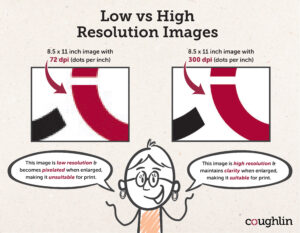
- High-Resolution Images – Images should be 300 dpi (dots per inch). Low-resolution images will look blurry.
- Send individual pages, not multi-page spreads – Pre-formatted files in spreads can cause issues. A single page ensures your artwork remains intact and prints correctly.
- Embed Your Fonts – If fonts aren’t embedded, they might change or disappear when printed.
By checking off those boxes you will avoid the top four most commons errors people make when submitting their artwork to a commercial printer.
We understand that sometimes we can use language that sounds foreign. We can’t help it – we are print and paper nerds 🤓.
Here is a quick guide to some of the common terms we use and some tips on understanding them:
Bleed vs Trim
Trim = The final size after cutting.
Bleed = Extra image area beyond the trim.
Keep important text at least ¼ inch inside the trim line so it doesn’t get cut off.
Example: If your piece is 6” x 4”, with bleed it should be 6.25” x 4.25”.
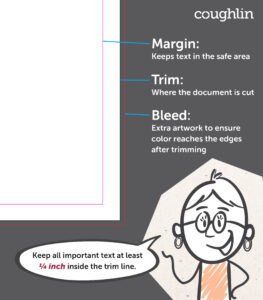
Image Resolution
Aim for 300 dpi for clear printing.
Quick check: Zoom in to 300%. If it looks pixelated, it’s too low-res.
Photos and Images
Avoid images from the web—they’re usually 72 dpi (too low).
Large images (like 28” x 40” at 72 dpi) can work because you’ll shrink them down.
Templates Can Help
Use printer-provided templates to make sure your design meets all requirements.
Bottom line: A print-ready file saves time, money, and stress. Follow these steps, and your design will look as good on paper as it does on screen!


