

Going Postal with your Mailing Lists
Creating a properly structured mailing list saves money and helps ensure deliverability.
Preparation serves as the cornerstone of any successful mailing project, beginning with the proper formatting of your mailing list.
In this blog article we will walk you through all aspects of creating a mailing list that will meet the postal service regulations and save you money.
Ensuring each address in your mailing list is correctly structured according to USPS standards optimizes delivery efficiency while minimizing delays and undelivered mail.
The United States Postal Service (USPS) mandates comprehensive formatting guidelines, including the use of uppercase letters, standardized abbreviations, and precise placement of address components like ZIP+4 codes. They provide Publication 28: Postal Addressing Standards, a 200+ page resource detailing formatting rules, valid abbreviations, and preparation best practices. Available through the USPS Postal Explorer website, this document serves as the definitive guide for optimizing mailing lists to meet automation requirements and ensure accurate processing.
While this might excite a few of you, most of us do not have time for that! Here are the cliff-notes to help you achieve the mailing list of our dreams.
A Basic Example:
The basic address format that includes the maximum list of fields we use when preparing mail and mailing lists would be:
<Prefix> <First Name> <Middle Initial> <Last Name> <Suffix>
<Title>
<Company>
<Address Line 1>
<Address Line 2>
<City>, <State> <Zip Code> <Country>
Creating a mailing data table
Creating a structured table for your mailing list is the critical first step in ensuring data integrity. We recommend using a spreadsheet program such as Microsoft Excel or Google Sheets.
When building your spreadsheet, include dedicated columns for all USPS-required components such as Name, Company, Address Line 1, Address Line 2, City, State, and ZIP+4, as well as any custom fields specific to your mailing. Below is a sample image and a sample spreadsheet you can download:
Yeah, that spreadsheet might seem a bit overwhelming. Let’s go through each section of the mailing label and highlight the requirements and best practices so you can become a mailing list pro.
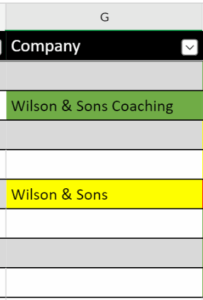
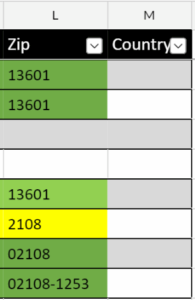
Throughout this article, we share various screenshots as examples with variations in address formatting. Green represents proper formatting per USPS standards. Samples highlighted in yellow could work, however, they are not optimal. Those highlighted in red are unacceptable and will require correction to get to the standard.
Special Character Guidelines
BEFORE we start entering or editing our list, we need to consider special characters. These are characters that are added for emphasis in standard writing but are discouraged by the post office in a properly formatted address block.
❌ PROHIBITED – The USPS recommends eliminating these characters from address blocks unless specifically required:
- Double spaces, asterisks (*), commas (except between city/state), periods, parentheses, quotation marks, colons, semicolon
⚠️ CONDITIONAL USE – In certain cases, the following characters make sense and are acceptable:
- Apostrophes: Permitted in names (e.g., O’Brien) or business titles (Smith’s Auto)
- Hyphens: Allowed in ZIP+4 codes (12345-6789) and hyphenated surnames (Smith-Jones)
✅ RECOMMENDED – When possible, use the following:
- Ampersand: Use the ampersand (&) to shorten joint names or business titles (Wilson & Sons Coaching)
Name Fields Optimization
The primary fields for the name section are: prefix, First Name, Middle, Last Name, Suffix, and Title.

For optimal postal software compatibility, format names as follows:
- Preferred: First Name: Bob | Last Name: Smith
- Alternative: First Name: Bob Smith | Last Name: [leave blank]
Avoid inverted formats like First Name: Smith, Bob, as commas disrupt automated processing and appear impersonal. For joint recipients (e.g., spouses or families), consolidate entries into a single line:- First Name: Bob & Sue | Last Name: Smith
- First Name: Bob | Last Name: Smith & Sue Smith-Jones
For most addresses, we streamline name fields by consolidating components into two primary categories: First Name and Last Name. This involves merging the Prefix, First Name, and Middle Initial into the First Name field, while combining Last Name and Suffix into the Last Name field. While this format serves as our standard approach, you retain full flexibility to structure fields according to your specific needs.
Company Name
Always place company names in the Company field rather than Address Line 1.
Street & PO Box Addresses
The address block takes some special care. What information you can and should enter, as well as where you enter it, all plays a role in having a great mailing list.

PO Box Priority: When both physical addresses and PO Boxes exist, store the PO Box in Address Line 1 and the physical address in Address Line 2.
Secondary address elements (apartment, suite, or lot numbers) should generally be included in Address Line 1, as Address Line 2 is rarely utilized in standard USPS formatting. For optimal results, place these components directly after the primary address:
Example:
Address Line 1: 123 Main Street Apt 4B
Address Line 2: [Leave blank]
For PO Boxes specifically, adhere to these USPS-mandated formatting rules:
- Label Format: Use “PO Box” (uppercase “PO”, no periods, space between “PO” and “Box”)
- Prohibited Variations: Avoid “P.O. Box”, “Postal Box”, “POB”, or any localized abbreviations
- Number Placement: Place the box number immediately after “PO Box” without intervening characters
Correct Example: PO BOX 12345
Incorrect Example: P.O. BOX#12345
City, State and Zip Code Formatting
These components require strict separation into three distinct fields:
- City: Watertown (no commas or state abbreviations)
- State: NY (two-letter uppercase code)
- ZIP Code: 13601 (five-digit format) or 01234-5678 (ZIP+4)
Avoid combined fields like Watertown, NY 13601, as embedded commas disrupt automated processing.
Critical ZIP Code Protocol
Configure your ZIP Code field as a text field (not numeric) to preserve leading zeros (e.g., 01234 instead of truncated 1234). This formatting is automatically maintained in ZIP+4 entries (01234-5678), but explicit text formatting is essential for five-digit codes.
Additional Data Fields
For any additional data points needed in your mailing-such as membership status, outstanding dues, or ID numbers-add dedicated columns after the Country field. This ensures seamless integration without disrupting core address formatting.
Though we can fix minor formatting errors in our systems, providing well-structured data from the start greatly speeds up processing and ensures more accurate delivery.
To jump-start your project, [here is a link] to an Excel spreadsheet featuring formatted fields for USPS compatibility. This will ensure the highest deliver-ability and quickest turnaround time on your mailing project.
If this process seems like too much to tackle, give us a call. Our team has created custom tools that verify abbreviations, remove problematic characters, and, coming soon, automatic ZIP code correction. We also connect to the USPS database to verify addresses and update with the National Change Of Address [NCOA] data.
Ready to optimize your mailing list? Download our template or connect with our mailing list specialists for a personalized consultation!
CALL NOW 315-788-8560


